
Enterprises that purchase Pharmacy Technician's University will log into the PTU Platform.
User Account Creation
The Group Client Services team will provide the Program Director with their initial login information. The Program Director will go to the PTU site, enter the username and password provided, and click Login.
- Click the "Home" tab.
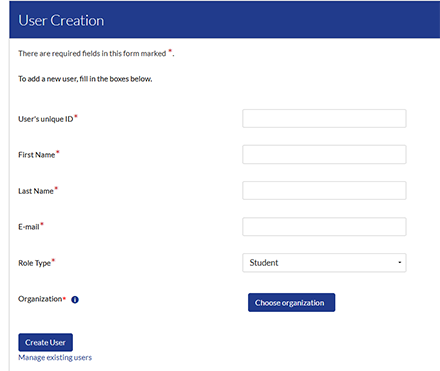
- Locate the "User Creation" section.
- Complete the User Creation form.
- If more than one Organization has been defined, click "Choose Organization".
- Click the "+" and select the appropriate location/organization for the user being added.
- There may be organization specific guidelines for creating users. Any special requirements will be provided to the Program Director during implementation.
- Click "Create User".
Managing Existing Users
- Click the "Home" tab.
- Locate the "User Creation" section.
- At the bottom of the "User Creation" form, click the "Manage Existing Users" link.
- To deactivate/activate a user, click the check box next to their name.