This service is available to Enterprises for an additional fee. Contact your Sales Representative for more information or submit a Quote Request.
TRC staff can create courses using the content supplied by the Enterprise. These course can then be assigned to the Enterprise's learners. These courses will not have reportable CE credit.
From the Learning Management Portal Home Page
- Click "Supplied Courses" from the navigation menu. (Login in prompted.)
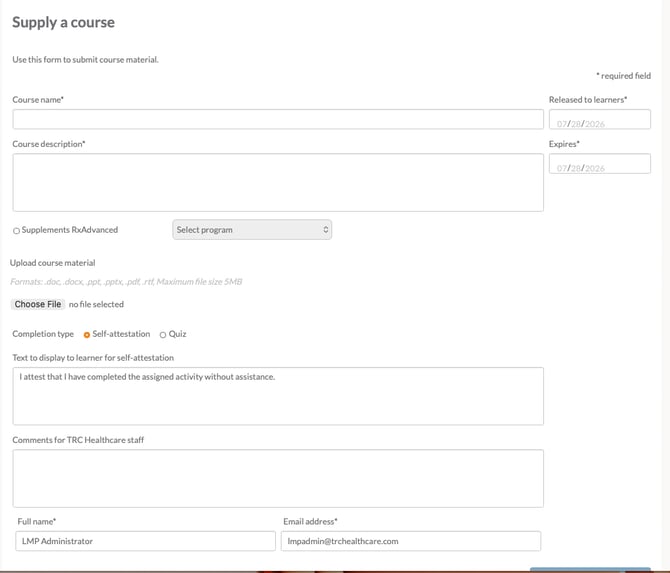
- Complete the "Supply a course" form.
- Enter the Course Name as it should be displayed to learners.
- Enter the Date to release the course to learners.
- Enter a Course Description to display to learners.
- Enter the date the course expires.
- Upload your course material by clicking "Choose File".
- Choose the course completion type:
- Self-Attestation
- Quiz (Include the Quiz questions and answers in the course material.)
- Add any comments for TRC Staff.
- Click "Submit"
TRC staff will reach out to the submitter when the course is created for review and final approval.