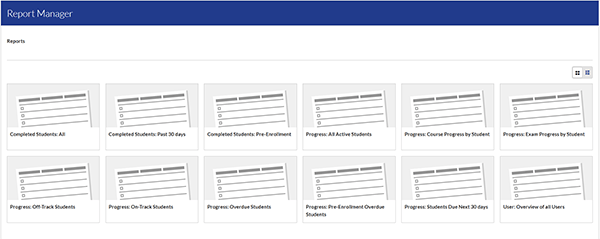
Program Administrators have a variety of reports available to review student progress.
- Click the "Home" tab.
- Locate the "Report Manager" section.
- Click on an available report to view the details.
Available Reports
Completed Students: All: Shows all students who have completed one or more programs.
Completed Students: Past 30 days: Shows all students who have complete one or more programs in past 30-days.
Progress: All Active Students: Shows the progress of all active students in the associated programs.
Progress Course: Progress by Student: Shows course completions and progress course by course for an individual student.
Progress Exam: Progress by Student: Shows the exam completions and progress by exam for an individual student.
Progress: Off-Track Students: Shows students who are not meeting the weekly goals and may require extra effort to complete the program before the program due date.
Progress: On-Track Students: Shows students who are meeting the weekly goals and should finish the program before the program due date.
Progress: Overdue Students: Shows students who have not complete the program by the program due date.
Progress: Students Due Next 30 days: Shows students who are expected to complete the program in the next thirty (30) days.
User: Overview of all Users: Shows all users in the platform and their associated roles.