Did you know that Bula’s tracking tools can help you keep up with changes in legislation and regulation?
Our Bills and Proposed Rules email reports allow you to determine the frequency and content of your notifications, and are designed to keep you informed, plus ensure that important events stay on your radar.
How to Monitor Reports in the Bills and Proposed Rules Database:
- Search legislative and regulatory updates in all of your jurisdictions.
- Customize a search query specific to your needs.
- Search by keyword, jurisdiction, law type, time-frame, or topics.
- Schedule the report to be sent to you on your desired schedule.
- Download the report as an Excel Workbook file.
- Create as many search queries, reports, and alerts as you wish.
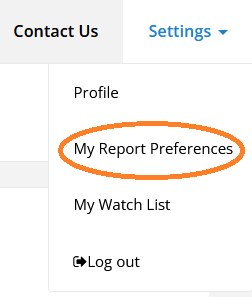
To create these reports, go to Settings > My Report Preferences at the top right of your Bula dashboard:
Click "add" next to "My Bills and Proposed Rules report emails." Fill out the details that fit your needs, then save. You will begin receiving reports at the cadence you selected during set up.

Additionally, the Bula Watchlist email is another valuable tool for staying updated on important changes. It allows users to subscribe to customized reports to keep track of specific bills or rules that matter to their organization. This feature delivers only the information you need, cutting through unnecessary details and saving you time, so you can focus on high-priority items.
What You Get:
- Tailored Report Tracking: The Watch List enables you to customize your report subscriptions, allowing you to handpick the bills and regulations most important to your needs.
- Weekly Updates: With our subscription function, you’ll receive weekly status updates directly to your inbox, eliminating the need to search for updates.
- Focused Insights: The custom report is tailored to your preferences, providing you with the most relevant information.
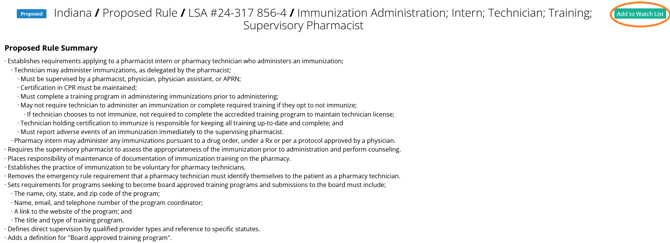
Simply select “Add to Watchlist” while viewing a bill or proposed rule and you will be subscribed to real-time notifications when an event is added to the item.